Accentris Power Point Template: A Comprehensive Guide for Professional Presentations
Understanding the Accentris Power Point Template
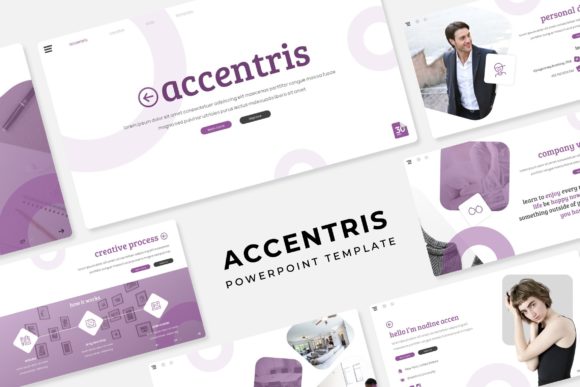
The Accentris Power Point Template is a versatile and professional tool designed to help users create impactful and visually appealing presentations. With 150 total slides, this template offers a wide range of options to suit various presentation needs. Each template includes 30 slides, with 5 premade color variations, allowing for customization and flexibility in design.
Key Features of the Accentris Power Point Template
The Accentris Power Point Template stands out with its comprehensive set of features, making it a robust choice for both beginners and experienced presenters. Here are some of the key features:
- 150 Total Slides: The template provides a vast array of slide designs, ensuring that you can find the perfect fit for your content.
- 5 Premade Colors: Choose from 5 different color schemes, each with 30 unique slides, to match your brand or personal style.
- Handcrafted Infographics: The template includes beautifully designed infographics, which can be easily edited and customized to convey complex information clearly.
- Section Break Slides: These slides help to organize your presentation into clear, logical sections, enhancing the flow and structure.
- Gallery and Portfolio Slides: Showcase your work, projects, or images with these professionally designed gallery and portfolio slides.
- Resizable and Editable Graphic Picture Placeholder: Drag and drop your images into the placeholders, which can be resized and edited to fit your needs.
- Based on Master Slides: The template is built using PowerPoint's master slide feature, ensuring consistency and ease of use.
- Pixel-Perfect Illustrations: All illustrations are meticulously crafted to ensure high quality and visual appeal.
What’s Included in the Accentris Power Point Template
The Accentris Power Point Template comes with everything you need to create a professional and polished presentation. Here’s what you get:
- 5 PPTX Files: Standard 4:3 aspect ratio files for traditional screen displays.
- 5 PPTX Widescreen Files: 16:9 aspect ratio files for modern widescreen displays.
- 5 Premade Color Variations: Each variation includes 30 unique slides, providing a total of 150 slides.
- Readme First Document: A detailed guide to help you understand and use the template effectively.
- Free Font Download Link: Access to the free fonts used in the template, ensuring consistent typography. Note: All photographs or pictures used in the preview are not included; they are intended for illustration purposes only.
Comparing Accentris with Other Power Point Templates
When comparing the Accentris Power Point Template with other similar templates, several factors come into play. Here’s a breakdown of how Accentris stacks up:
Design Quality and Customization
Accentris offers a high level of design quality with its handcrafted infographics and pixel-perfect illustrations. The 5 premade color variations and 30 unique slides per variation provide ample customization options, allowing you to tailor the template to your specific needs. This level of customization is often more extensive than what you might find in many other templates, which may offer fewer color options and less variety in slide designs.
User-Friendliness and Ease of Use
The Accentris Power Point Template is built using master slides, which makes it easy to maintain consistency throughout your presentation. The drag-and-drop functionality for images and the ability to resize and edit graphic picture placeholders further enhance the user experience. While some other templates may also offer these features, the intuitive design and comprehensive Readme document in Accentris make it particularly user-friendly.
Value for Money
Considering the 150 total slides, 5 color variations, and the inclusion of both standard and widescreen formats, the Accentris Power Point Template provides excellent value for money. Many other templates may offer fewer slides or less variety, making Accentris a cost-effective choice for those looking for a comprehensive and versatile solution.
When to Choose the Accentris Power Point Template
The Accentris Power Point Template is an excellent choice for a wide range of presentation needs, but it may not be the best fit for every situation. Here are some scenarios where Accentris shines:
- Professional Business Presentations: The clean, modern design and professional look of Accentris make it ideal for business presentations, whether you’re pitching to clients, presenting at a conference, or reporting to stakeholders.
- Educational and Academic Presentations: The well-organized structure and section break slides in Accentris are perfect for creating educational and academic presentations, such as lectures, seminars, and research presentations.
- Creative and Design-Oriented Presentations: The handcrafted infographics and pixel-perfect illustrations in Accentris are particularly well-suited for creative and design-oriented presentations, where visual appeal is crucial.
When to Consider Other Options
While the Accentris Power Point Template is a strong choice for many situations, there are times when another option might be more appropriate. Here are some scenarios where you might want to consider alternatives:
- Very Specific Industry Needs: If you require a template that is specifically tailored to a particular industry (e.g., medical, legal, or financial), you may find that a specialized template better meets your needs.
- Minimalist Designs: If you prefer a more minimalist and simple design, Accentris, with its rich and varied features, might feel too elaborate. In such cases, a simpler template with fewer design elements might be more suitable.
- Budget Constraints: While Accentris offers great value, if you have a very tight budget and need a basic template, there are free or lower-cost alternatives available that might be more appropriate.
Making the Right Decision
Choosing the right Power Point template is a decision that should be based on your specific needs, preferences, and the type of presentation you are creating. The Accentris Power Point Template offers a high level of design quality, customization, and user-friendliness, making it a strong contender for a wide range of professional and creative presentations. However, it’s important to consider your specific requirements and constraints to ensure that the template you choose is the best fit for your project.
By carefully evaluating the features, strengths, and limitations of the Accentris Power Point Template, you can make a more informed decision and create presentations that are both visually appealing and effective in conveying your message.